How I Designed a Security-First AWS Architecture for My Website
How I designed my AWS website around a private S3 origin, CloudFront, temporary deployment identity, validation, and explicit security trade-offs.
Published on 9 min read
On this page
This is my production website, built with Astro and delivered as static content. Generating the pages was straightforward. Publishing them was the easy part. The harder questions were how to expose the site without exposing its storage, how deployments should authenticate to AWS, what browsers should be allowed to do, and how operational changes or failures would become visible. I considered those security decisions before treating the project as finished. The related hands-on LAB records the implementation and validation behind the architecture.
The website became a security architecture problem
Static generation removes much of the server-side application complexity found in a dynamic website. It does not remove the infrastructure that delivers the content or the identities that can change it.
The site still needed a controlled public route, private storage, browser protections, deployment access, monitoring, and an audit trail. Each area raised a different question. Which component should accept internet traffic? Could visitors bypass it? What permissions did the deployment need? How would I know whether a control behaved as intended?
Thinking in terms of secure architecture decisions kept the work focused on relationships rather than a collection of AWS services. The next step was to identify where requests, identities, and permissions crossed between systems with different levels of trust.
Start with the trust boundaries
A trust boundary is a point where a request, identity, or permission moves into a system with different access rules. Identifying those points helped separate the public website from the private resources and deployment permissions behind it.
Public: User → Route 53 / DNSSEC → CloudFront → OAC → private S3
Deployment: GitHub Actions → OIDC → STS → scoped IAM role → S3 and CloudFront
In the public path, Route 53 resolves the domain and CloudFront accepts the request. Origin Access Control, or OAC, governs CloudFront’s access to the private S3 bucket. Visitors receive the content without receiving storage permissions.
The deployment path has a different purpose. GitHub Actions presents an OpenID Connect, or OIDC, identity. AWS Security Token Service, or STS, uses that verified identity to issue temporary credentials for a scoped IAM role.
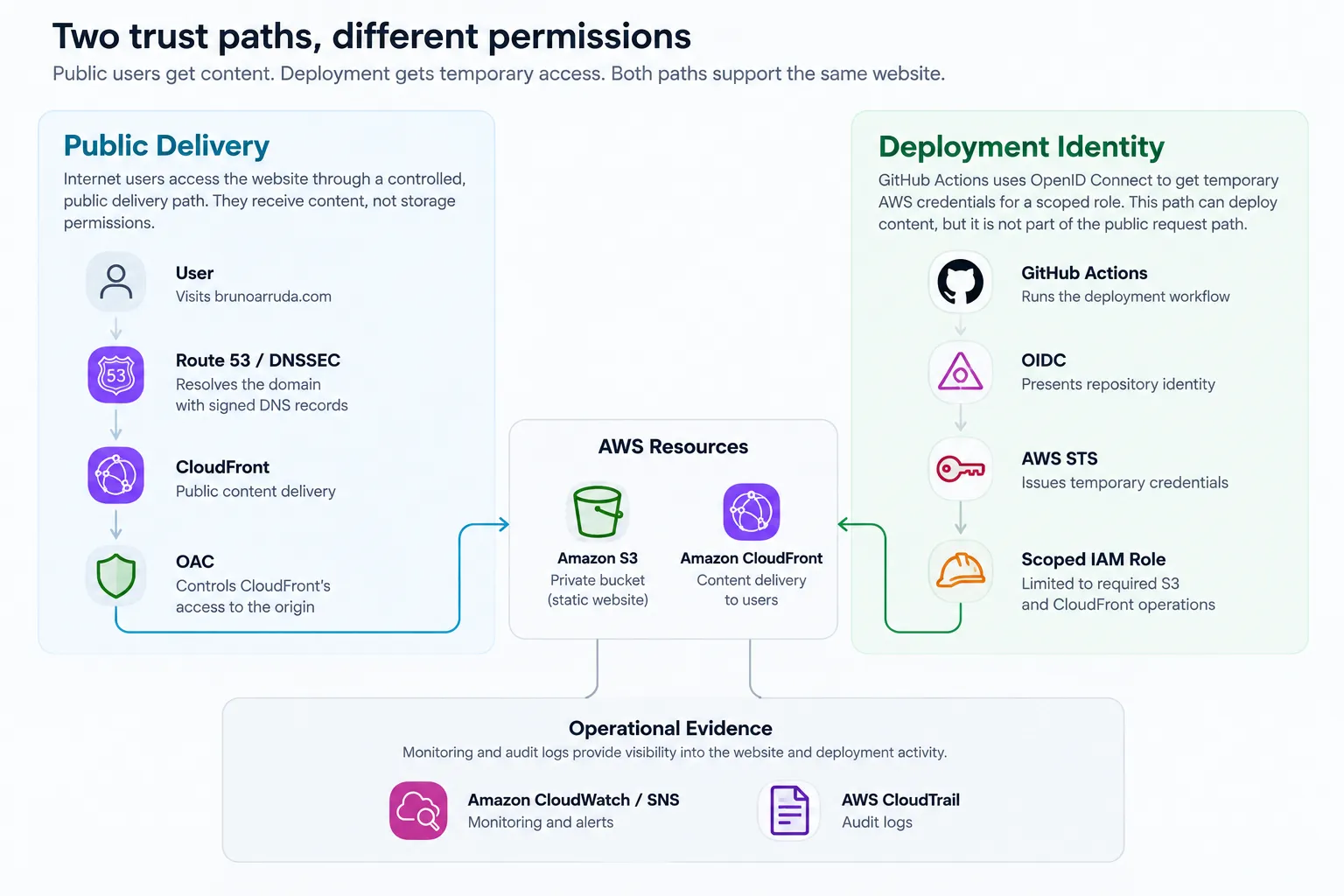
The paths meet at the deployed resources, but they do not share the same trust model. Public requests never become storage identities, and deployment automation receives temporary AWS permissions without joining the visitor request path.
A public website does not require a public origin
A public website does not require a public origin.
Visitors need access to the content, but they do not need direct access to the storage system holding it. That distinction became the central decision in the delivery design.
CloudFront is the intended public entry point. It handles the production request path and provides the place where delivery policy, canonical routing, browser controls, and monitoring assumptions can be applied. The S3 bucket behind it remains private.
A public S3 origin would create an alternate route to the files. Requests using that route could bypass the behavior expected at CloudFront, including edge policies, headers, and canonical redirects. Keeping S3 private reduces that bypass opportunity instead of trying to reproduce the same controls on multiple public paths.
OAC constrains the service-to-service relationship between CloudFront and S3. CloudFront can retrieve the objects required to serve the site, but that access does not make the bucket generally available to internet users.
I tested the distinction from both sides. A direct request to the tested S3 origin path returned 403 Forbidden, while the website remained available through CloudFront. That result confirmed the specific property I expected at the time of the test: the delivery layer was public, and the tested origin path was not.
This arrangement requires more configuration than enabling S3 website hosting and exposing the bucket. The additional work was justified because it created one intended public route and a clearer boundary around storage.
Put protection at the edge
Once CloudFront became the public entry point, I could organize protection around the path each request follows. The aim was not to collect services. It was to address different risks before a request reached the origin or content ran in a browser.
The path starts with DNS. Route 53 provides authoritative records, while DNSSEC lets a validating resolver authenticate the signed response. It strengthens confidence in the DNS answer without preventing every DNS attack or configuration problem. The connection then moves to CloudFront over TLS using an ACM certificate, with HTTP redirected to HTTPS.
After the content reaches the browser, security headers and a Content Security Policy limit behaviors such as framing, MIME-type interpretation, optional browser capabilities, and which scripts may execute. These controls reduce specific browser risks; they do not claim to prevent every possible injection attack.
AWS WAF provides visibility into requests at the public edge. It remains in monitor mode while production traffic builds a baseline for investigation and tuning. Traffic changes were visible, but the available evidence did not establish that they were malicious.
Each layer has a defined job. Its value comes from the risk it addresses, not from increasing the number of controls attached to the website.
Deployment credentials should not live forever
The deployment pipeline is part of the security architecture because it can change production content. Treating it as simple automation would overlook an identity with write access to the site and permission to invalidate the CloudFront cache.
I intentionally avoided permanent AWS access keys in GitHub. Long-lived credentials can be copied, exposed, or reused outside the deployment that originally needed them. The pipeline instead authenticates each run when access is required.
GitHub Actions presents a signed OIDC token describing its identity. AWS STS checks that identity against the IAM role’s trust conditions and returns temporary credentials only when the expected claims match. The conditions restrict access to the approved repository identity and the main branch rather than accepting a broad wildcard.
After authentication, the session uses a dedicated deployment role. The role follows a least-privilege approach: it is scoped to the S3 operations needed to deploy the generated site and the CloudFront operation needed to create an invalidation. It does not rely on administrative or broad full-access managed policies.
A successful production deployment showed that those permissions were sufficient for the required upload, deletion, and invalidation actions. It did not formally prove that no narrower policy could ever work.
Exact trust also has a maintenance cost. A repository identity or deployment-model change may require an intentional policy update. That is preferable to making authentication more permissive simply to avoid future configuration work.
Controls need evidence, not just configuration
A configured control shows intent. Observed behavior tests whether the intended property worked.
I used representative checks across the main trust boundaries. The tested direct S3 request returned 403 while CloudFront continued serving the site. A public validating resolver authenticated the DNSSEC response. Expected browser features continued working under the revised CSP, with no relevant CSP console errors observed during the checks.
Operational and deployment controls also produced evidence. A real CloudWatch 4xx alarm changed state and triggered its SNS notification action. Separately, a normal production push authenticated through OIDC, deployed the site to S3, and created the required CloudFront invalidation.
These results are point-in-time tests of specific properties. A 403 response does not guarantee that S3 can never be misconfigured, and one successful deployment does not prove that every future run will succeed.
The complete implementation, validation matrix, troubleshooting record, and supporting evidence are documented in the hands-on AWS security LAB. Keeping those details there allows this Article to focus on why the architecture took this shape.
Stronger is not always safer overall
A setting cannot be judged only by how restrictive it appears. Risk reduction also has to be weighed against compatibility, cost, and the effort required to operate a control well.
WAF remains in monitor mode so that requests can be observed before blocking rules are justified and tuned. Suspicious requests are therefore not blocked automatically. For the current stage, establishing a baseline was more useful than enabling premature enforcement.
Compatibility shaped other choices. HSTS does not include all subdomains because an existing HTTP-dependent subdomain would stop working. The CSP still permits legitimate inline styles required by the current site. Normal responses receive the expected edge controls, but the custom 404 does not receive every function-added CSP and Permissions-Policy header in exactly the same way.
I also avoided adding controls simply to increase the security-service count. Broader CloudTrail coverage remained outside the current requirement, and adding Lambda@Edge only to change the limited 404 case would introduce more complexity than the risk justified.
These are project-specific trade-offs, not recommendations for every environment. Their value comes from being explicit, reviewable, and connected to the risks and constraints of this site.
What failures taught me
OIDC identity. The first role-assumption attempt failed because the GitHub token subject did not match the format expected by the trust policy. I inspected the actual claims without printing the token, then corrected the exact audience and subject conditions. The useful lesson was to understand the identity being presented rather than introduce a broad wildcard merely to make authentication succeed.
CSP behavior. The initial script policy allowed unsafe inline execution. Inspection of the Astro production build found one required executable inline script used for theme initialization. After understanding its purpose, I authorized that script with a SHA-256 hash and retested the expected browser behavior. The deployment workflow now checks the reviewed home-page script hash and stops before AWS authentication if it changes. That guard detects drift in this specific script; it does not validate every generated page or the complete deployed CSP.
Monitoring signals. A real 4xx alarm entered the alarm state and triggered SNS successfully, proving that the detection and notification path worked. The event still required interpretation. On a low-traffic website, a small number of requests can move a percentage sharply, and the available WAF telemetry did not prove malicious activity. An alert should start an investigation, not supply its conclusion.
From architecture to implementation
Good cloud security architecture is not about enabling every available control. It is about understanding trust, reducing unnecessary exposure, testing important assumptions, and documenting trade-offs.
The full LAB contains the implementation, validation, evidence, and troubleshooting. The GitHub repository contains the website source and deployment workflow. This Article explains the reasoning that connects them.